Let the system plan the day — so you can spend time with customers.
Route planning calculates the shortest, most realistic route for each crew member based on addresses, skills, and opening hours. When something changes, the route adapts automatically.
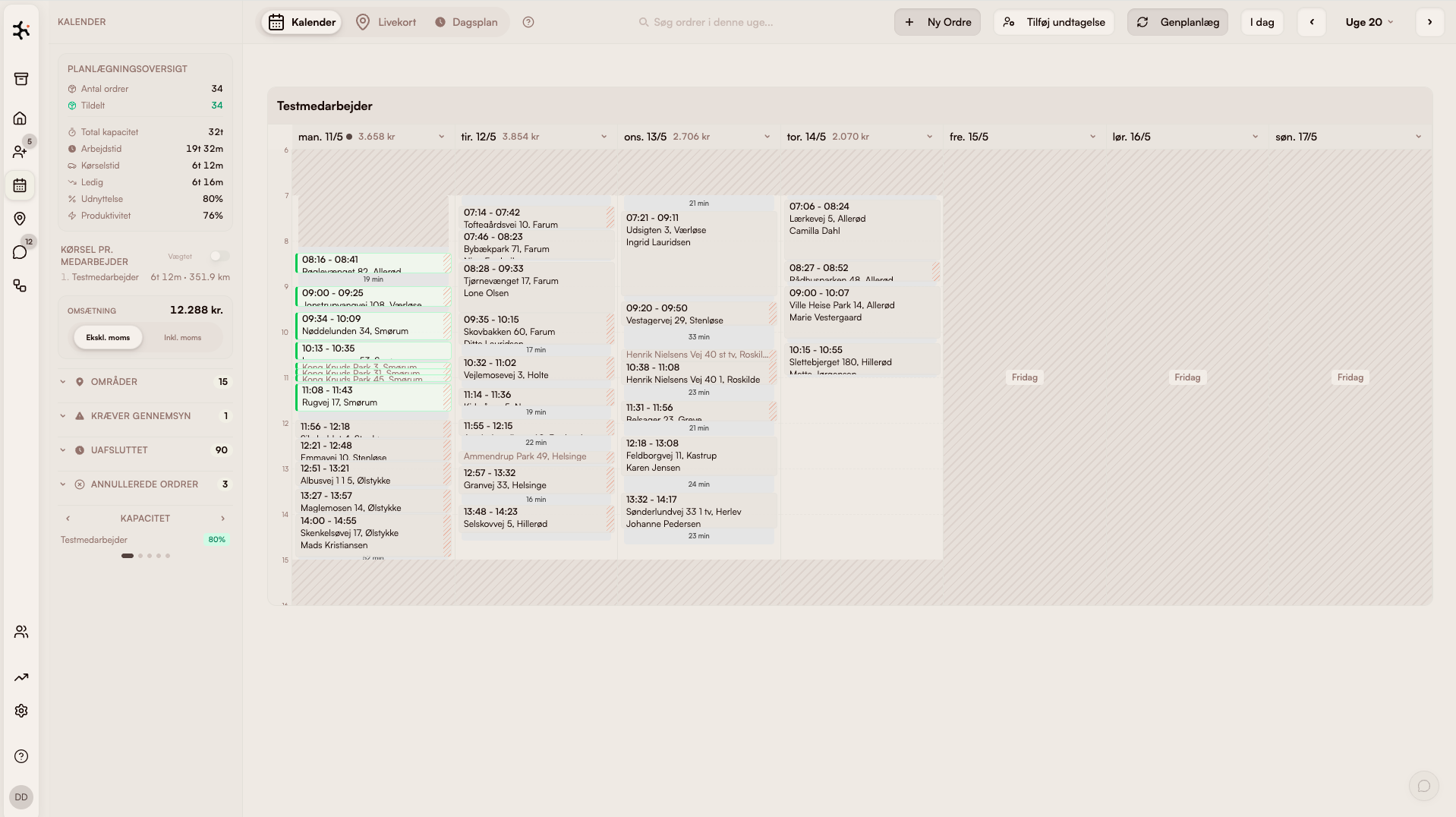
What's inside Route planning
Automatic optimization
Calculates the optimal task order — saving kilometers, fuel, and time.
Skill-aware assignment
Tasks are only assigned to crew who can do them — e.g. work at height or special equipment.
Handles changes
Cancellation or urgent job? The system replans without you having to touch anything.
Drag-and-drop tweaks
Want to move a visit yourself? Drag it on the map — the system handles the rest.
How field service teams use route optimization
Window cleaners
80 recurring subscription customers on fixed intervals → the system builds the day's optimal route → 30% less driving and 1-2 extra customers per day.
Read more about this industryCleaning companies
Recurring cleaning contracts across the city → optimization respects opening hours (schools, offices) and crew skills.
Read more about this industryHVAC
Service visits mixed with urgent calls → AI replans the day in real time and gives customers precise ETAs.
Read more about this industryLandscapers
Seasonal jobs with trailers and equipment → routes built around material pickups and waste sorting, so vehicles don't return home multiple times per day.
Read more about this industryModules that pair with Route planning
Day plan
Today's jobs in your pocket
Crews get the day's jobs, addresses, and checklists right in the app. One tap: navigate.
Learn moreFleet / GPS
See the crew in real time
Live GPS via the mobile app. See where everyone is, dispatch urgent jobs, and give customers accurate ETAs.
Learn moreWorkflow
Automate the repetitive
Pick the data, the schedule, and the recipient. The workflow sends the message — or files the summary in your inbox.
Learn moreFrequently asked questions about route optimization
How much can I save with route optimization?
Does the system handle customer time windows?
What happens if a crew member calls in sick?
Can I override the system manually?
What tech powers the route optimization?
Go deeper on route planning
Trades using this module, problems it solves, integrations it fits with, and articles where we go into detail.
Trades where this module makes a difference
How route planning is used in the trades we work most closely with.
Window cleaners
Classic case: fixed routes, subscriptions and fast morning dispatch.
Read moreCleaning
Contracts, key tracking and hour-based invoicing — built for cleaning companies.
Read moreLandscaping
Seasonal planning and weather-aware route optimization.
Read morePest control
Service contracts with digital treatment reports and documentation.
Read morePlumbing
Urgent dispatch, project jobs and time/materials tracking.
Read moreProblems this module solves
Deep dives into the operational challenges this module addresses — from route optimization to customer portal.
Integrations that fit
Tools Clientflow connects directly with — so data never has to be entered twice.
Read more
Our own articles on the topic — from concrete numbers to strategic choices.
How smarter routes pay for themselves
Concrete numbers: how much drive time and fuel an AI route actually saves a small business.
Read moreRoute planning for window cleaners
Complete guide: how much you save, which software works, and how AI beats manual planning.
Read moreFrom 10 programs to one
What actually happens when a service business consolidates operations.
Read moreWhy we built Clientflow
Daniel tells the story behind the platform — and why the trade needed something new.
Read moreHow to use it in practice
Help center articles — for when you want to look under the hood.
Compare with alternatives
How Clientflow stacks up against other tools in the market.
Ready to run your entire
business in one system?
Try the demo for 7 days — real data. We help you get started.