A phone system that lives in your CRM.
The telephony module turns Clientflow into your phone exchange. Call customers in one click, build a phone menu with key options and queues, and let AI transcribe and summarize every call. Everything lands automatically in the customer's unified thread alongside SMS and email.
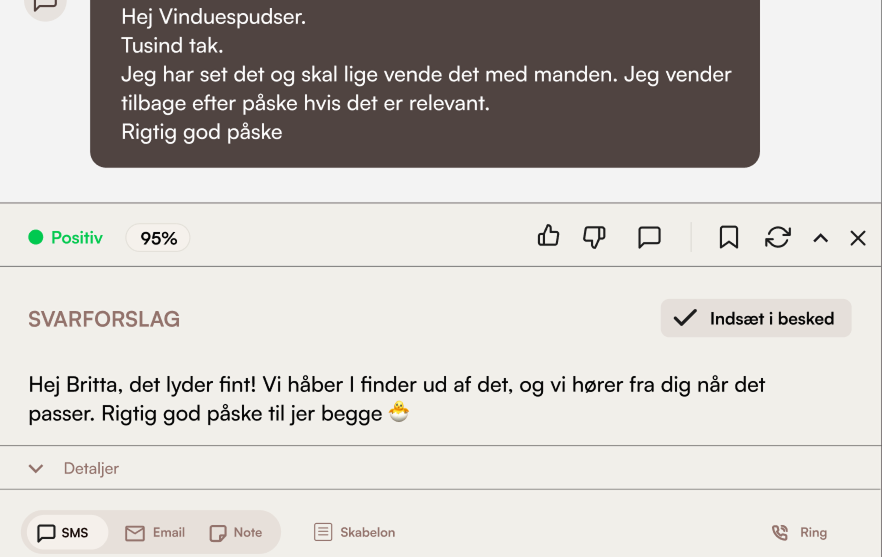
What's inside Telephony
Call straight from the customer card
Tap the call button on a contact or conversation and your phone and theirs connect automatically. A built-in dialer lets you type a number — if it's unknown, the contact is created for you.
Phone menu (IVR) with key options
Build a greeting and “press 1 for…, press 2 for…” that routes callers to the right team or queue. A menu option can also text the caller automatically.
Queues & opening hours
Put calls in a queue and ring your team by the rules you choose — ring all, round robin or random — with hold music and a wait limit. Set opening hours per weekday and handle out-of-hours calls differently.
Voicemail & call recording
Unanswered calls can be left as a voicemail with a clear voicemail badge and playback. You can also record ordinary calls — saved and playable straight from the conversation.
AI transcription & summary
Recorded calls are transcribed automatically, summarized as bullet points and given a read on the customer's mood — so you can catch up on a call without listening to the whole thing.
Personal numbers & Do Not Disturb
Each team member has their own number and can switch on Do Not Disturb — for an hour or the rest of the day. You decide whether field workers may call and text from the company number.
How service businesses use the telephony module
Window cleaners
Customer calls to move a visit → the phone menu routes the call to the office → the call is transcribed and the summary is saved on the customer card → the new date is confirmed by SMS.
Read more about this industryCleaning companies
Enquiry outside opening hours → the customer hears a friendly message and can leave a voicemail → the message is transcribed and lands on the right customer, so no enquiry is lost.
Read more about this industryPlumbers & electricians
Many calls at once → a queue rings the technicians in turn with hold music → whoever answers sees the customer's full history while the phone is still ringing.
Read more about this industryModules that pair with Telephony
Communication
Calls, SMS & email in one thread
All customer dialogue in one chronological thread. Calls are transcribed. SMS reminders are sent automatically.
Learn moreAI assistant
Reply suggestions and next steps
Suggests replies to customer enquiries and the next actions — you approve and send yourself.
Learn moreCustomer registry
Every customer, in one place
Searchable registry with history, documents, communication, and address validation via DAWA.
Learn moreFrequently asked questions about telephony
Do I have to switch phone providers to use telephony?
What does telephony cost?
How does AI call transcription work?
Can staff get peace and quiet when they're busy?
Do I have to record my own menu prompts?
Where do I set up the phone system?
Go deeper on telephony
Trades using this module, problems it solves, integrations it fits with, and articles where we go into detail.
Trades where this module makes a difference
How telephony is used in the trades we work most closely with.
Window cleaners
Classic case: fixed routes, subscriptions and fast morning dispatch.
Read moreCleaning
Contracts, key tracking and hour-based invoicing — built for cleaning companies.
Read morePlumbing
Urgent dispatch, project jobs and time/materials tracking.
Read moreHVAC
Equipment register, urgent dispatch and mandatory inspections.
Read moreElectrician
Service visits, case tracking and invoicing with on-site materials.
Read moreProblems this module solves
Deep dives into the operational challenges this module addresses — from route optimization to customer portal.
Read more
Our own articles on the topic — from concrete numbers to strategic choices.
A phone system for service businesses
Why a phone system belongs in your CRM — calls, SMS and email on the same customer card.
Read moreFrom 10 programs to one
What actually happens when a service business consolidates operations.
Read moreWhy we built Clientflow
Daniel tells the story behind the platform — and why the trade needed something new.
Read moreHow to use it in practice
Help center articles — for when you want to look under the hood.
Compare with alternatives
How Clientflow stacks up against other tools in the market.
Ready to run your entire
business in one system?
Try the demo for 7 days — real data. We help you get started.